Features/Admin & insights
See everything
across the org
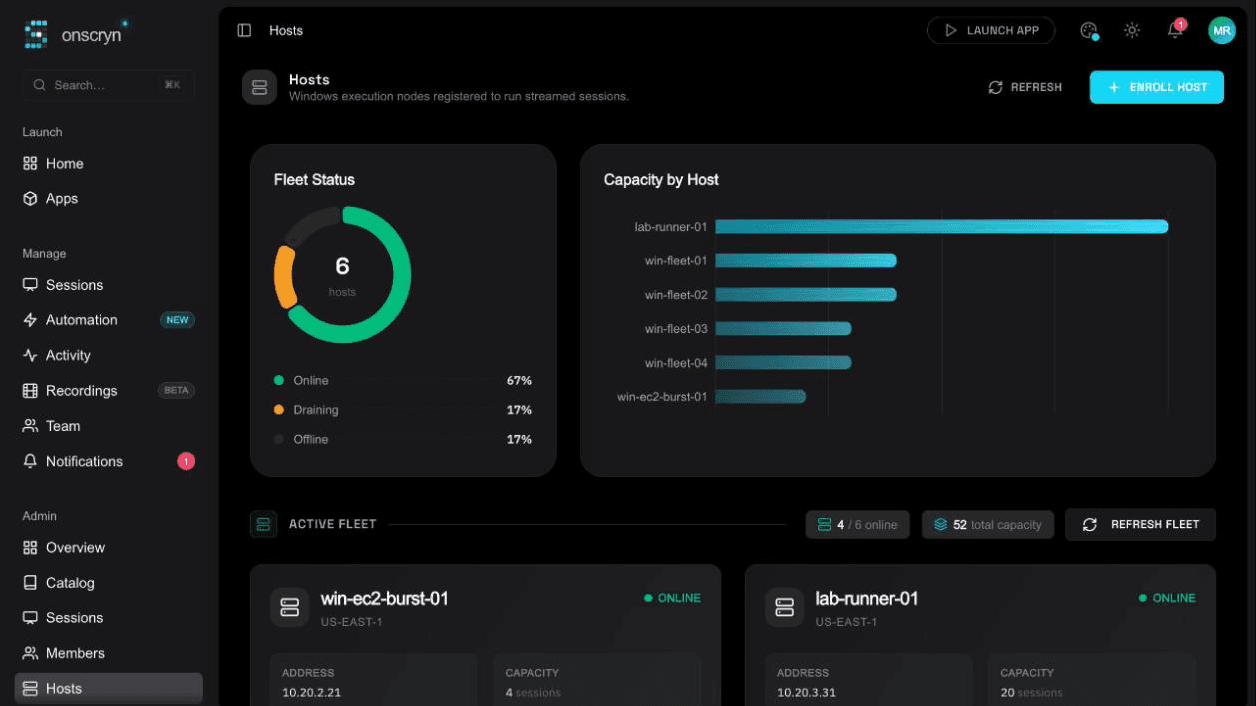
Watch live sessions, host health and automation runs in one place, search every session, review the audit trail, and keep track of usage and plan.
Live sessions
3
of 25 allowed
Capacity
4/6 hosts
online
Fleet volume · 14d
Audit
- morgan.reyes signed in
- workflow “Enter invoice” ran · ok
- ada.okafor invited a viewer
- session 8f3a started · Notepad
- 01
Monitor
The admin overview shows live sessions, hosts online and recent automation runs at a glance.
- 02
Investigate
Search every session, whether live, ended or failed, and open its recording.
- 03
Review
Go through the audit log and notifications to see what happened and who did it.
What it does.
Admin overview
Live sessions, hosts online, automation runs and fleet session volume, across the whole organization.
Every session, searchable
One list of all sessions with their status, so a failed or long-running one is easy to find.
Audit log
Automation runs and platform events across the org, filterable by status and by what triggered them.
Insights on the home page
Session activity over time, your recently launched apps and short callouts about what has changed.
Notifications and activity
Session outcomes, invites and alerts in one feed, plus your own recent sessions.
Application catalog
Register applications and configure each one, including recording, clipboard, file transfer and watermark.
Usage and plan
A billing page with your organization's usage, plan and subscription.
Built for daily use
Search and jump anywhere with the command palette, in light or dark themes with a choice of accent color.
Related guides
How to run a Windows app in a browser
Windows software can't run natively in a browser, but it can run on a Windows host and stream to one. How that works, what you need, and where it falls short.
6 min readWhat is Windows application streaming?
Application streaming delivers a running app to a user's screen without installing it. What it is, how it differs from virtualization and remote desktop, and when to use it.
8 min readApplication streaming vs VDI: how to choose
A practical comparison of streaming individual Windows apps and running full virtual desktops: users, cost drivers, management, security and when each fits.