SSO and access control
for legacy Windows apps.
Legacy applications were built before single sign-on. They have their own logins, or none at all, and no idea who your identity provider is. You can still give them modern access control by putting the sign-in in front of the application instead of inside it.
Move the sign-in in front
When apps are launched through a streaming platform, the platform is the front door. People authenticate there, with SSO over OIDC or SAML, and only then get a session. The legacy application itself does not need to change.
Roles and mapping
Roles (owner, admin, member and viewer) are scoped to your organization. Your identity provider's roles or groups can be mapped onto them. A viewer role allows watching without driving, and members can be sent straight into a default application on sign-in.
Verify the domain
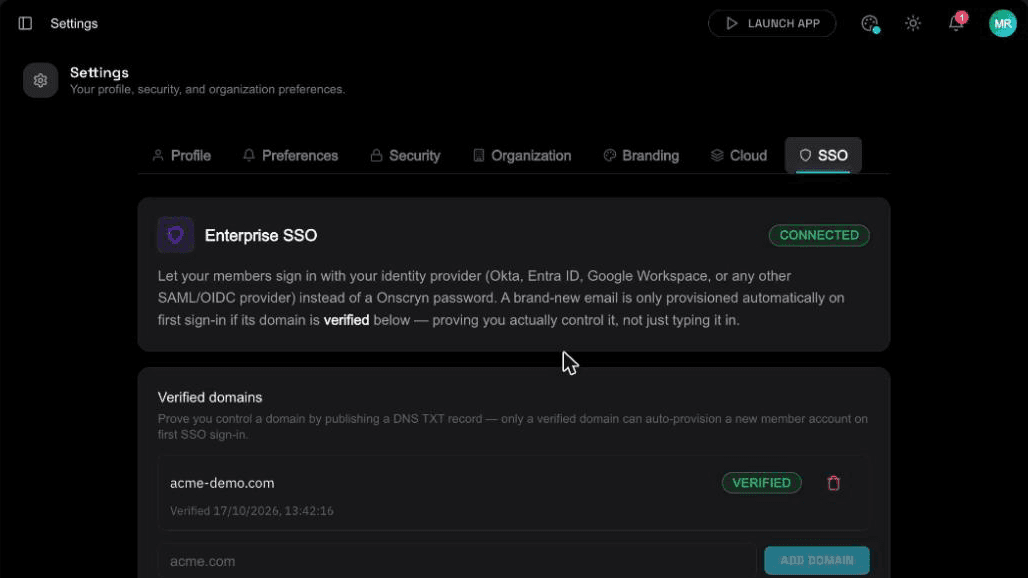
Before anyone is automatically provisioned from an email domain, ownership of that domain should be proven. Onscryn verifies it through DNS, so one organization can't claim another's domain.
Revocation that is immediate
Each request is checked against a token version. Demote or remove someone and their next request fails, with no waiting for a token to expire. Streams need a valid ticket for the exact session, and the broker closes connections without one.
What the legacy app still needs
The application may still have its own login inside the session. SSO protects who can reach it; it does not replace the app's own accounts. Plan for both.
Two layers of sign-in
There are really two questions: who may reach the application, and who is the person inside it. SSO answers the first, in front of the session. The second is the application's own account, which may still be needed. Some teams keep the application's login as it is, others set it up so each session lands already signed in.
Joiners, movers and leavers
People join, change roles and leave. With sign-in at the front door, adding access means granting a role and an app, and removing it means taking the role away. Role mapping from your identity provider keeps this in step with groups you already maintain.
An audit trail
Because every session starts from a verified identity, you know who opened what and when. The audit log records account and admin activity around that, and recordings, where used, show what happened inside.
Planning for outages and edge cases
Decide what happens if your identity provider is unavailable, and who is allowed to get in some other way. Keep an owner account for emergencies, and test the sign-in flow, including a removed user, before you rely on it.
Illustration
A worked example
Imagine a firm whose old document system uses a shared login that everyone knows. Nobody can say who did what, and when someone leaves the password is not changed.
They put the system behind SSO. Each person signs in with their own identity, opens the application from the catalog, and works in their own session. When someone leaves, removing them from the identity provider stops their access. Now there is a record of who opened the system, and nothing shared to rotate.
SSO setup checklist
- Choose OIDC or SAML, depending on your identity provider.
- Verify ownership of your email domain through DNS.
- Map your provider's groups to roles, including a default role.
- Decide who is an owner and keep a break-glass account.
- Test sign-in as a member, a viewer, and a user you have removed.
- Check SSO is included in your plan.
Related features
Questions.
SSO over OIDC and SAML, plan-dependent, with roles scoped to your organization.