Where should your Windows host live:
office or cloud?
Streaming a Windows app means the app runs on a Windows machine, and that machine has to live somewhere. Because the hosts are yours, you choose: a server in your office, a virtual machine with a cloud provider, or a mix. The right answer depends on what the app needs to reach.
By the Onscryn team · Published · 6 min read
What a host is
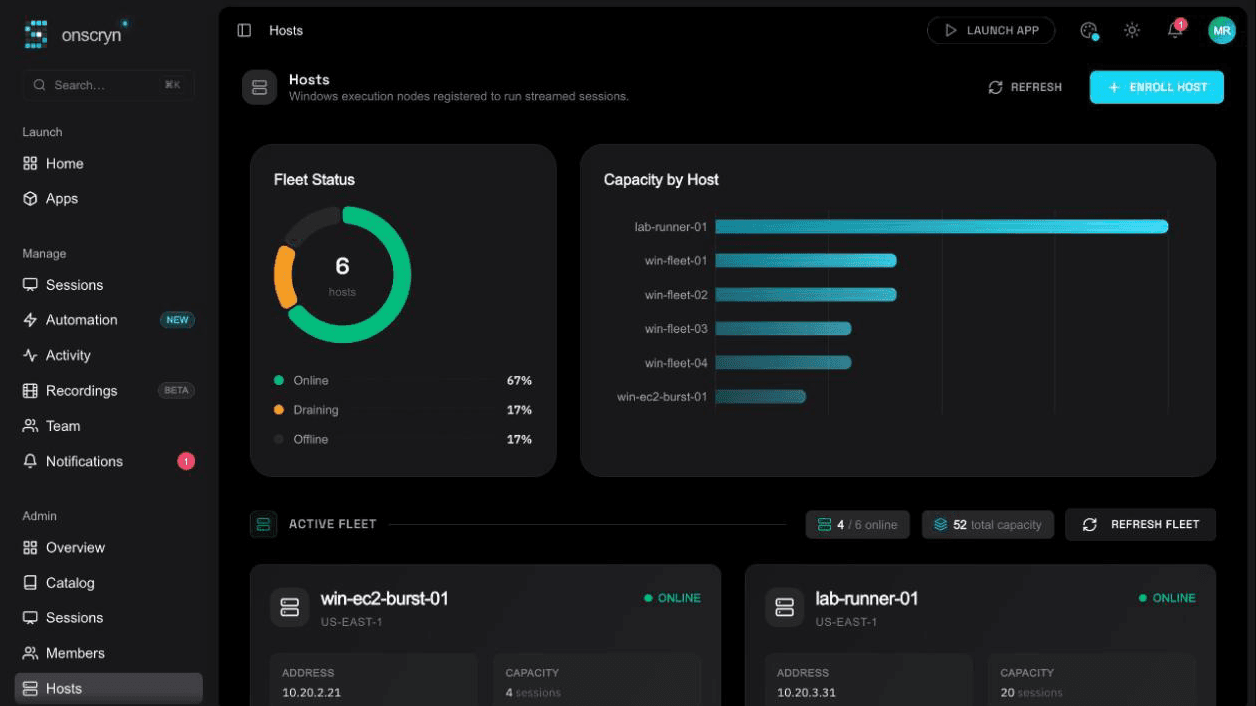
A host is a Windows machine that runs the Onscryn agent. You create an enrollment token in the admin, run the agent on the machine with it, and the host comes online. Sessions are placed on hosts with spare capacity, and only on your hosts.
01
Create an enrollment token
In the admin. You can revoke it whenever you like.
02
Run the agent
On the Windows machine, with that token.
03
The host comes online
Capacity and health show on one page.
04
Sessions are placed
On your hosts with room, and only on your hosts.
When an office server fits
A machine in your own network is a natural choice when the application is tied to things that already live there.
- The app talks to a database or file server on your network.
- You already have the hardware and the Windows licences.
- Data has to stay in a place you physically control.
When a cloud VM fits
A cloud machine suits teams that want to add capacity without buying hardware.
- The app, or the systems it reaches, are already in that cloud.
- You want to add or remove capacity as demand changes.
- People are spread across regions and you want hosts nearer to them.
What to weigh either way
A few questions decide most placements.
- What the application must reach, and how close the host needs to be to it.
- Where your people are, since distance to the host affects how responsive it feels.
- Licences, since Windows and the application still need them wherever the host is.
- Capacity, including whether some people or apps need a more powerful class of host.
Connection and security
Your host reaches Onscryn over an outbound, encrypted connection, so nothing on your network has to be opened to the internet. The application runs in its own separate account for each session, and only what your rules allow leaves the host.
Start small, then add
You can begin with one host and one application, prove the experience, and add hosts as demand grows. How many hosts you can connect, the performance classes you can assign and the warm pool all depend on your plan.
Related features
Questions.
Yes. Hosts are any Windows machines you enroll, wherever they run.